Built for ChatGPT
Turn ChatGPT answers intoeditable notes
Connect once, then ask ChatGPT to save an answer as an editable Markdown note in Truffle Journal on your iPhone. Edit tables, add checklists and reminders, and ask ChatGPT to read or update your notes later. No screenshots or copy-paste.
Who Truffle Journal is for
Truffle is best for people who already use ChatGPT heavily and already try to save useful outputs somewhere.
How it works
Three steps
Use ChatGPT the way you already do.
Tell ChatGPT to add it to Truffle Journal.
Through a direct ChatGPT app connection (MCP)
When you need it again, ChatGPT can search Truffle Journal and bring it back.
In ChatGPT
Save, find, and update your journal right inside ChatGPT
Truffle works where you already use ChatGPT. Save one useful answer, bring it back later, and keep working on the same entry — without the old copy-paste workflow.
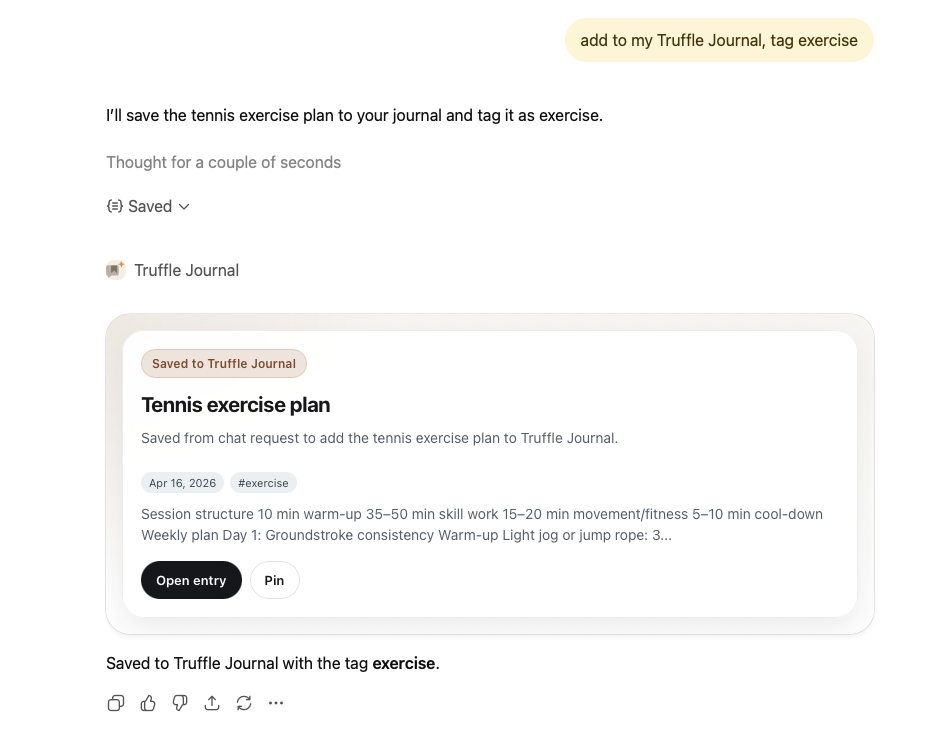
I tell ChatGPT: "add to my Truffle Journal, tag exercise." ChatGPT confirms the action, then it returns a clean Truffle Journal entry card right inside the conversation — with the title, date, tags, and quick actions like open entry and pin.
1 / 3
Save the useful part without leaving ChatGPT
Tell ChatGPT to add it to Truffle Journal and get a clean entry card back immediately.
Saving is not a hidden background action or another copy-paste task. You can ask in plain language, and ChatGPT gives you an immediate, visible result inside the conversation.
In Truffle Journal
From chat to journal
AI Chat
A real ChatGPT conversation
Truffle Journal
SQL Joins Cheat Sheet
| Join | Keeps | Unmatched rows | Tiny result with Left={1,2,3,4}, Right={2,3,4,5} |
|---|---|---|---|
INNER JOIN | Only matches | Dropped from both sides | 2,3,4 |
LEFT JOIN | All left rows | Right side becomes `NULL` | 1,2,3,4 |
FULL OUTER JOIN | All rows from both sides | Missing side becomes `NULL` | 1,2,3,4,5 |
| Memory hook | Meaning |
|---|---|
| INNER = intersection | Only overlap |
| LEFT = keep left | Always keep left table |
| FULL = keep everything | Keep both tables |
| Example output idea | Result |
|---|---|
| `LEFT JOIN` and left row has no match | right columns = `NULL` |
| `FULL OUTER JOIN` and right row has no match | left columns = `NULL` |
Fast rule: ask, Which rows am I guaranteed to keep?
Entry Details
Very concise SQL joins memorization table.
Created
Mar 31, 2026 at 17:26
Updated
Mar 31, 2026 at 19:12
Context Summary
Compact cheat sheet for INNER JOIN, LEFT JOIN, and FULL OUTER JOIN using a tiny set example for memorization.
Caused by Prompt
save it to truffle journal, use table, I want very concise like cheat sheet, so I can often take out and memorize
Model
gpt-54-thinking
A preview of the Truffle Journal app
Turn a dense explanation into a compact cheat sheet you can pull up any time.
Why Truffle Journal
Chat history remembers conversations. It doesn't remember what mattered.
- Chat history remembers conversations
- It does not remember what mattered
- Screenshots save too much
- Full copy-paste turns into clutter
- Truffle is for the few answers that deserve a second life
Keep the part worth reusing
Attach why it mattered
Find it by topic, not memory
Bring it back at the right moment
Features
More than a saved note
Save from ChatGPT
No copy-paste workflow. Keep the part worth revisiting.
Edit in real markdown
Turn a raw answer into a real note with formatting, tables, and your own edits.
Bring it back from chat
Ask ChatGPT to search Truffle Journal when you remember the idea, not the exact words.
Turn it into action
Use reminders and checklists when a saved answer becomes something to do.
Why I built this
Why I built this
I use ChatGPT heavily and kept pasting useful answers into notes. It looked organized when I saved it, but later most of it felt like noise. What I actually wanted back was usually one reusable part — a checklist, framework, cheat sheet, or decision note.
Privacy
Kept close
What matters here should feel safe to keep. Truffle Journal only saves, lists, or searches your journal when you ask it to. Your data is encrypted in transit and at rest, with access scoped to your account.
Start Here
Setup takes one-time effort — then it disappears
Install the iPhone app
Add ChatGPT app
Simply add Truffle Journal to ChatGPT. Add it once, then keep using ChatGPT normally.
Save your first useful answer
Say "Add to Truffle Journal" in any ChatGPT chat.
Need help? Hi@trufflejournal.com
When found, make a note of.
— Captain Cuttle
Contact
Say Hello
Questions, ideas, feedback, or quiet curiosity are all welcome. Reach us anytime.
Stay in the loop
Get new release announcements and product updates, plus occasional invitations to share feedback or try beta features with special offers.
Prefer a conversation?
Hi@trufflejournal.com